Understand the different ways to log in to your SBI Card account safely and manage payments, statements, rewards, and card services online.
Last updated on: Jun 22, 2026
Managing your SBI Credit Card online can make tracking expenses and payments more convenient. SBI Card offers secure digital login options through its official website and mobile app, allowing you to view statements, pay bills, redeem reward points, and monitor transactions. Understanding the correct login steps and security measures can help you access your account smoothly while protecting your personal and financial information.
You can use SBI Card’s official digital channels to access your SBI credit card account securely. Below are the supported ways and exact step-by-step actions required:
Use the SBI Card website to sign in with relevant details and complete OTP verification.
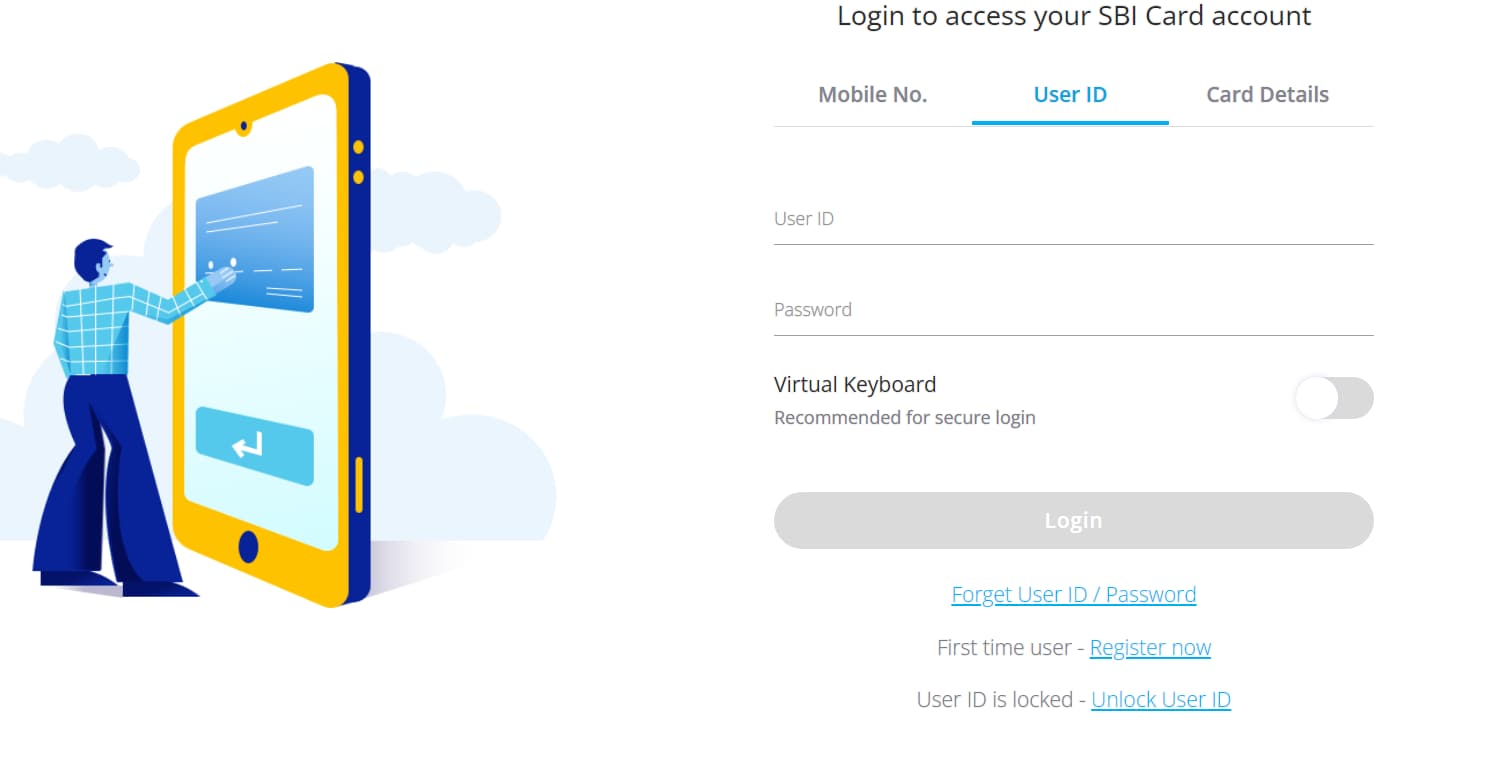
Go to www.sbicard.com and click on ‘Login’ from the top right corner.
On the next page, you can log in with your user ID, mobile number, or card details.
Choose the suitable option and verify the on-screen authentication steps if prompted.
Enter your Password (if you choose to log in with your user ID) and click on ‘Proceed’.
You will be asked to generate an OTP sent to your registered mobile number and/or email.
Enter the OTP to enter the online dashboard.
Here, you can view your statements, payments, rewards and other services.
Use the SBI Card website to register if you have never created online credentials:
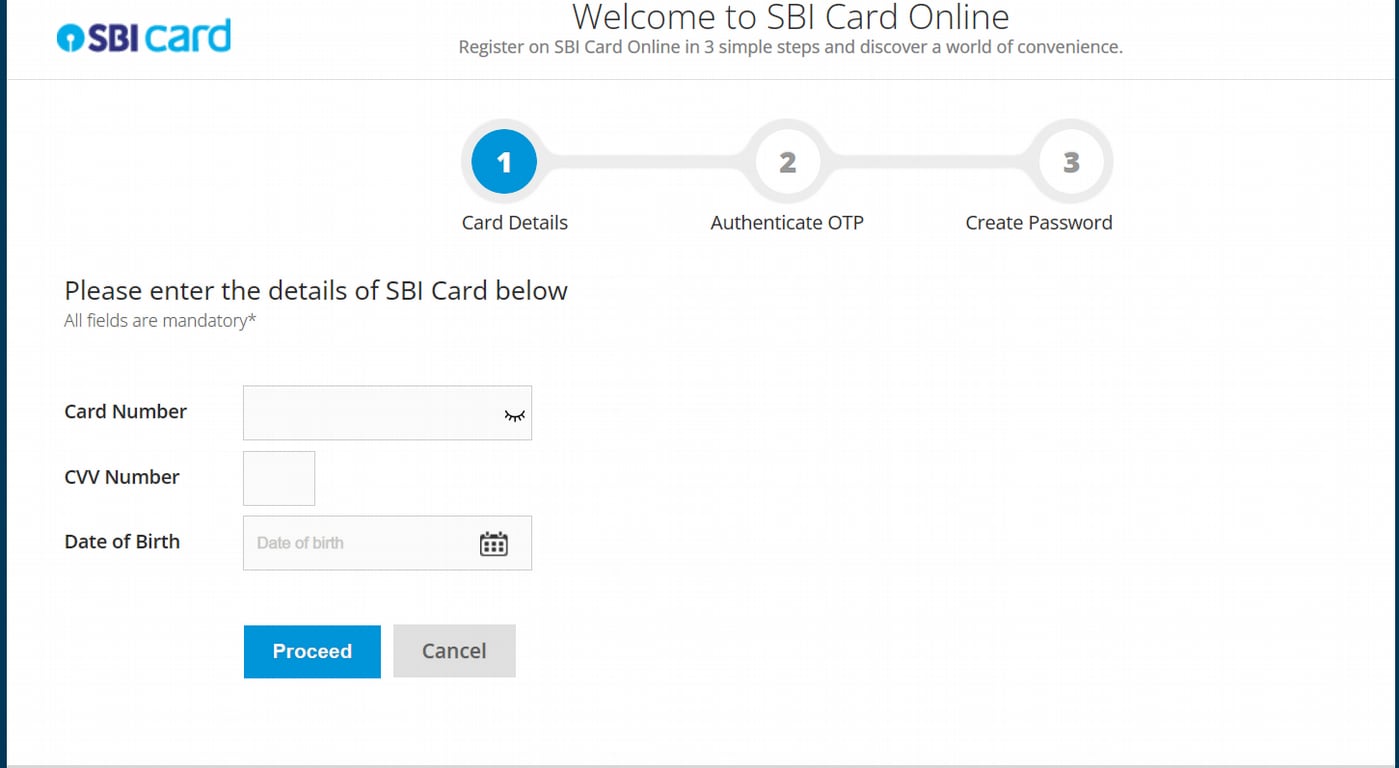
Go to www.sbicard.com and click on the ‘New User? Register Now’ option.
Enter your primary card number, CVV, date of birth, and click on ‘Proceed’.
Enter the OTP sent to your registered mobile number and email to continue.
Choose a user ID and password, confirm them and complete registration.
You can use these credentials next time to log in to your SBI Card account.
Use the SBI Card mobile app to log in with your existing credentials:
Open the app and tap on ‘Login’. Enter your user ID and password to continue.
You will receive an OTP on your registered mobile number /email
Enter the OTP and set the device name for device linking.
Set an M-PIN and enable Touch ID / Face ID if your device supports it.
After this, you can use MPIN or biometrics for quick secure logins.
Use the SBI Card mobile app to register on your smartphone and enable quick login methods:
Download the SBI Card Mobile App from the Google Play / App Store.
Tap on the ‘Sign-Up’ option and enter your card number, CVV and date of birth
Click on Generate OTP, then enter the OTP received on your registered number.
Link your device and choose a suitable User ID and Password to log in to your profile.
After first login you can set an M-PIN and enable Touch ID / Face ID (biometrics) for faster future access.
You can use SBI Card’s official website and mobile app to access a full set of net-banking facilities for your credit card. Below are the main services available and how to use them.
Use the SBI Card website or mobile app to check your statements, unbilled and posted transactions, and available limits in real time.
Log in to sbicard.com or open the SBI Card app.
Tap on ‘View Card Statement or Account Summary’ to download or view monthly statements and unbilled transactions.
Use date filters on the app/website to review transaction history and export a duplicate statement if needed.
Use SBI Card’s Pay options on the site or app to settle outstanding amounts via multiple digital routes.
On the app or sbicard.com, choose ‘Pay Now’ / ‘Pay Online’.
Select a payment method like NEFT/IMPS, UPI/QR, debit card, or SBI Pay channels (including YONO/Paynet)
Enter the amount (total due or minimum due) and confirm to continue.
Check the payment posting TAT and keep the transaction reference for records.
Use the Flexipay (Convert to EMI) option on the website or app to convert large purchases or eligible transactions into instalments.
Go to the ‘Convert to EMI’ / ‘Book Flexipay’ option on the app or website.
Select the transaction(s) you want to convert, choose tenure and review charges.
Confirm the conversion and note the EMI schedule and processing fees.
You can also request balance-transfer-on-EMI or other instalment products from the same menu.
Use the Rewards section on sbicard.com or the mobile app to view, set redemption goals, and redeem points with partners or catalogue offers.
Open the ‘Rewards’ / ‘Know your Reward Points’ in the app or site.
See your points summary and available redemption options (catalogue, partner redemptions, travel e-store).
Select an option, confirm redemption and follow any partner booking/payment flows.
Use the quick-action on the app or the website to immediately block a lost/stolen card and request replacement or re-issue.
In the app or on sbicard.com, tap on ‘Report Lost Card’ / ‘Block Card’.
Confirm card details and state your reason; the system will block the card instantly.
Request a replacement/reissue and track the service request status online.
You can also manage PIN operations from the same menu.
इससे पहले कि आप अपना एसबीआई क्रेडिट कार्ड लॉगिन करें, आपको एसबीआई नेट बैंकिंग पंजीकरण को पूरा करना होगा। शुरू करने के लिए इन आसान स्टेप्स को फॉलो करेंः
Go to www.sbicard.com and click on the ‘New User? Register Now’ option.
, समाप्ति तिथि, जन्म तिथि, और आगे बढ़ें पर क्लिक करें। CVV , expiry date, date of birth, and click on ‘Proceed’.
Enter the OTP sent to your registered mobile number and email to continue.
Choose a user ID and password, confirm them and complete the registration.
इसके बाद, आप लॉग इन करने के लिए अपने यूजरनेम और पासवर्ड का इस्तेमाल कर सकते हैं एसबीआई क्रेडिट कार्ड नेट बैंकिंग अकाउंट। आप इन क्रेडेंशियल्स का इस्तेमाल पर भी कर सकते हैं एक एसबीआई क्रेडिट कार्ड पिन उत्पन्न करें ऑनलाइन
अगर आप अपना एसबीआई क्रेडिट कार्ड लॉगिन पासवर्ड भूल जाते हैं, तो आप इसे रीसेट कर सकते हैं। इसके लिए चरण इस प्रकार हैंः
एस.बी.आई. कार्ड वेबसाइट के जरिए अपने क्रेडिट कार्ड नेट बैंकिंग अकाउंट में लॉग इन करें
भूल गई यूजर आईडी या पासवर्ड चुनें
अपना क्रेडिट कार्ड नंबर, सी.वी.वी, और जन्म तिथि भरें
वह ओ. टी. पी. दर्ज करें जो आपको एस. एम. एस. के जरिए मिला होगा
अब आप अपना पासवर्ड रीसेट कर पाएंगे।
You can use SBI Card’s official digital channels to diagnose and fix common login problems. Here are some common issues and short, actionable steps for each to follow.
Here are the steps to unlock your SBI Card User ID to restore access quickly.
Go to the Unlock page, enter primary card number, CVV and DOB, then authenticate with OTP and reset your password.
If unsuccessful, the account may auto-unlock after 24 hours or you can call SBI Card support for immediate help.
You can use the on-screen ‘Resend OTP’ option and confirm your registered contact details.
Verify your registered mobile number and email, then tap Resend OTP (you may request OTP up to the allowed retries).
If still not received, check network/SMS settings, try again after restarting the device, or contact the helpline to confirm/ update contact details.
Try these simple device and app/browser checks before contacting SBI Card support.
Try a different browser or device, clear browser cache/cookies, or update/reinstall the SBI Card mobile app.
If errors persist, note the exact error message or screenshot and contact SBI Card support for resolution.
Paying your SBI credit card bill via net banking can be done instantly on the official SBI Card website in a number of ways:
Pay via NEFT from any bank account using SBI Card’s dedicated beneficiary details.
Log in to your bank’s netbanking or mobile banking.
Add a beneficiary using the correct IFSC code: SBIN00CARDS and your SBI Card number. Remember to follow your bank’s beneficiary process.
Initiate NEFT for the outstanding amount and keep the transaction reference for confirmation.
Use Paynet to pay directly through your bank’s net-banking portal without adding beneficiaries.
On sbicard.com, choose ‘PAYNET-Pay Online’ or use the Paynet link.
Select your bank from the list; you will be redirected to your bank’s net-banking page.
Authorise the payment in your bank’s interface; note the reference and check posting TAT.
You can also use your bank’s net-banking facility to transfer funds to any SBI Visa credit card.
From your bank’s transfer/payee options choose the ‘Credit Card Payment’ or ‘Card’ transfer type (naming may vary by bank).
Enter your SBI Visa credit-card number and the amount, then authenticate per your bank’s flow.
Retain the transaction ID and confirm posting in your SBI Card statement.
Set a standing instruction to auto-debit due amounts from your bank account on the payment due date.
Register a standing instruction (NACH mandate) either via your bank’s net-banking (auto-debit instruction) or through your SBI Card’s account.
Log in to your account, go to the ‘Service’ section from the dashboard and select the ‘NACH’ tab
Specify the amount type (minimum, total due, or fixed amount) and the start date/tenure as required.
From the registration page, check the pre-filled details and enter your banking data. Complete the steps and authenticate the mandate form successfully.
Monitor the mandate status and keep an eye on the first debit to confirm correct setup.
You can change your SBI credit card PIN online, from the SBI Card website or mobile app. This process is instant and secure for managing your card's security.
Log in to your account on the SBI Card website and click on the 'Menu' option on the top left corner.
Select 'My Account' and then choose 'Manage PIN'. Select the credit card for which you want to change the PIN.
Click on 'Generate OTP' and enter the OTP received on your registered mobile number.
Enter your new 4-digit PIN twice and click 'Submit'.
Open and log in to the SBI Card mobile app.
Go to the 'Services' section in the menu.
Select 'Manage PIN' or 'Change PIN'.
Select the card, enter the OTP, and set the new 4-digit PIN.
You can check your SBI credit card statement online through the official website or mobile app. and view/download statements for the last 24 months.
Log in to sbicard.com using your User ID and password.
Click on ‘View Statement’ on the dashboard, or go to ‘My Account', then click om ‘Card Statement.
Select the desired month and click ‘Download’ to save the PDF.
ऐप में लॉग इन करें।
Select ‘Menu’, go to ‘My Account’, then ‘Card Statement’.
View or download your latest or previous statements.
Note that SBI sends a monthly statement to your registered email address. You can also subscribe to these e-statements via the ILA chatbot or website settings.
To ensure your SBI Credit Card login remains secure, follow these essential security practices:
Direct URL Entry: Always type the official URL sbicard.com directly into your browser's address bar. Avoid clicking on links in emails, SMS, or social media.
Verify Secure Connection: Ensure the website address begins with https:// and look for the padlock icon in the browser bar to confirm a secure, encrypted connection.
Check Last Login: Always verify the ‘Last Login’ date and time displayed after logging in to monitor for any unauthorised access.
Complex Passwords: Create a strong password (at least 12 characters) using a mix of uppercase, lowercase, numbers, and special characters.
Frequent Updates: Change your login password periodically (e.g., every 90 days) and ensure it is different from your last five passwords.
गोपनीयता: Never share your User ID, Password, PIN, CVV, or OTP with anyone. SBI will never ask for these details via phone, email, or SMS.
Avoid Public Networks: Never log in to your credit card account using public Wi-Fi or computers in cyber cafes.
Disable Auto-Save: Do not allow your browser or device to ‘Save Password’ or ‘Remember Me’ for banking sites.
Manage Mobile Apps: Only use the official SBI Card App and avoid installing remote access apps like AnyDesk or TeamViewer, which fraudsters can use to see your screen.
SBI Credit Card login and SBI Net Banking login operate on separate portals, each designed to manage distinct financial services and account functions.
पैरामीटर |
एसबीआई क्रेडिट कार्ड लॉगिन |
एसबीआई नेट बैंकिंग लॉगिन |
प्राथमिक उद्देश्य |
Exclusively for managing SBI credit card accounts and related services |
For accessing personal or corporate banking services |
What You Can Manage |
Credit card transactions, statements, bill payments, reward points, EMI requests, and card controls |
Savings/current accounts, fund transfers, deposits, and other banking operations |
Login Credentials |
User ID & Password, or Mobile Number & Card PIN (as applicable) |
Username and Password for personal or corporate internet banking |
रजिस्ट्रेशन की प्रक्रिया |
Requires credit card number, CVV, and date of birth for first-time setup |
Requires account details and internet banking activation through SBI |
प्रमुख विशेषताएं |
View billing date, download statements, convert transactions to EMI (Flexipay), redeem rewards, block/replace card |
NEFT/RTGS/IMPS transfers, utility bill payments, open FD/RD, request chequebooks |
एक्सेस प्लेटफ़ॉर्म |
SBI Card website and SBI Card Mobile App |
SBI Online portal (onlinesbi.sbi) |
समीक्षक
आप नेट बैंकिंग सुविधा का इस्तेमाल करके एसबीआई क्रेडिट कार्ड बिल का भुगतान कर सकते हैं। आपको सबसे पहले नेट बैंकिंग के लिए रजिस्टर करना होगा, जो आपको फंड ट्रांसफर करने, बिल भुगतान करने आदि के लिए नेट बैंकिंग सेवा का उपयोग करने की अनुमति देता है।
हाँ, एस.बी.आई. कार्ड लॉगिन/नेट बैंकिंग सेवा सुरक्षित है, और आप इसका इस्तेमाल अपने एसबीआई क्रेडिट कार्ड के लिए भुगतान करने और प्रबंधित करने के लिए कर सकते हैं.
एसबीआई क्रेडिट कार्ड नेट बैंकिंग सेवा के लिए यूजर आईडी एक यूनिक आईडी है जिसे आप एसबीआई नेट बैंकिंग ऑनलाइन पंजीकरण के समय जनरेट करते हैं। एसबीआई क्रेडिट कार्ड नेट बैंकिंग लॉगिन स्टेप को पूरा करने के लिए इस यूजर आईडी और सेट पासवर्ड की आवश्यकता होती है.
अप्रत्याशित परिस्थितियों के मामले में, जैसे कि आपके एसबीआई क्रेडिट कार्ड का नुकसान या चोरी, आप अपने क्रेडिट कार्ड को ब्लॉक कर सकते हैं। ऐसा करने के लिए, एसबीआई क्रेडिट कार्ड पेज पर जाएं और अपने क्रेडेंशियल्स का इस्तेमाल करके लॉग इन करें। अनुरोध टैब के तहत, रिपोर्ट लॉस्ट/स्टोल्ड कार्ड विकल्प खोजें और उस पर क्लिक करें। उस संबंधित कार्ड नंबर को चुनें जिसे आप रिपोर्ट करना चाहते हैं और यदि आप कार्ड को फिर से जारी करना चाहते हैं तो रीइस्यू कार्ड पर क्लिक करें। सबमिट पर क्लिक करें, और बैंक आपके क्रेडिट कार्ड को ब्लॉक कर देगा।
अपने एसबीआई क्रेडिट कार्ड को एक्टिव करने के अलग-अलग तरीके हैं। उदाहरण के लिए, आप एस.बी.आई. कार्ड लॉगिन पेज पर जा सकते हैं और अपने क्रेडिट कार्ड को सक्रिय करने के लिए बस अपने एस.बी.आई. कार्ड खाते में लॉग इन कर सकते हैं। वैकल्पिक रूप से, आप अपना कार्ड एक्टिवेट करने के लिए बैंक के हेल्प लाइन नंबर पर कॉल भी कर सकते हैं या उन्हें www.sbicard.com/email. पर लिख सकते हैं
अपने कार्ड को एक्टिवेट करने का एक और तरीका है अपने ऑनलाइन अकाउंट यूजर आईडी और पासवर्ड के साथ चैटबॉट आईएलए में लॉग इन करना.
आप अपने एसबीआई क्रेडिट कार्ड एप्लिकेशन को ऑनलाइन या ऑफ़लाइन ट्रैक कर सकते हैं। यदि आप इसे ऑनलाइन करना चाहते हैं, तो आप बैंक की वेबसाइट पर जा सकते हैं और तुरंत आवेदन की स्थिति की जांच करने के लिए अपना कार्ड आवेदन संख्या और संदर्भ संख्या दर्ज कर सकते हैं। वैकल्पिक रूप से, आप अपने क्रेडिट कार्ड आवेदन की स्थिति के बारे में पूछताछ करने के लिए 1800-180-1290 पर एसबीआई क्रेडिट कार्ड कस्टम्रर केयर से भी संपर्क कर सकते हैं।
आप आमतौर पर कैश के खिलाफ अपने क्रेडिट कार्ड रिवॉर्ड पॉइंट्स को रिडीम नहीं कर सकते। आप केवल अपने एस.बी.आई. कार्ड लॉगिन का उपयोग पूर्व निर्धारित कैटलॉग में उत्पादों या सेवाओं के खिलाफ अपने अंकों को भुनाने के लिए कर सकते हैं या अपने कार्ड पर बकाया राशि का भुगतान करने के लिए उनका उपयोग कर सकते हैं। हालाँकि, अगर आप कैश के लिए अपने रिवॉर्ड पॉइंट्स को रिडीम करना चाहते हैं, तो बैंक एक विकल्प प्रदान करता है। आपको आगे की सहायता के लिए बैंक को www.sbicard.com/email पर लिखना होगा या हेल्प लाइन नंबर पर कॉल करना होगा।
अपना क्रेडिट कार्ड अकाउंट बंद करने के लिए आपको अपने एस.बी.आई. कार्ड लॉगिन का इस्तेमाल करने की ज़रूरत नहीं है। आप ईमेल के माध्यम से बैंक को लिखकर अपना एसबीआई क्रेडिट कार्ड बंद कर सकते हैं। आप बैंक के हेल्प लाइन नंबर पर भी कॉल कर सकते हैं। अपने प्राथमिक क्रेडिट कार्ड को समाप्त करने से इससे जुड़े किसी भी ऐड-ऑन कार्ड को भी समाप्त कर दिया जाएगा। हालांकि, बैंक द्वारा यह सुनिश्चित करने के बाद ही अकाउंट बंद किया जाएगा कि सभी बकाया का भुगतान कर दिया गया है.
आप एसबीआई कार्ड्स नेट बैंकिंग सुविधाओं के माध्यम से कई तरह की सुविधाओं का लाभ उठा सकते हैं। आप क्रेडिट कार्ड के लिए ऑनलाइन आवेदन कर सकते हैं, लेन-देन को निर्बाध रूप से पूरा कर सकते हैं, महत्वपूर्ण वित्तीय जानकारी आदि प्राप्त कर सकते हैं।
Register on sbicard.com using the ‘First time user – Register now’ link and enter your primary card number, CVV and date of birth. Verify the OTP sent to your registered mobile or email and create a User ID and password to complete online registration.
Click on ‘Forgot User ID / Password’ on the sbicard.com login page, provide your card number, CVV and date of birth, then generate an OTP. Authenticate with the OTP sent to your registered mobile/email and set a new password to regain access.
Login failures often stem from an account lock after repeated incorrect attempts, wrong user ID/password, mismatched authentication image/text, or OTP issues and device/browser problems. Use the ‘Unlock User ID’ option, verify registered contact details, clear cache or try another browser/device, and contact the helpline if the problem continues.
On sbicard.com select ‘Pay Now’ and choose from payment routes such as NEFT, Paynet-Pay Online, NACH Mandate, etc. Follow the selected gateway’s instructions to complete payment. Keep the transaction reference and allow the stated posting time for the payment to reflect on your account.
Generate or reset your card PIN via sbicard.com’s ‘Manage PIN’ service or through the SBI Card mobile app by authenticating with card details and OTP. You can also generate/change PIN via the bank’s IVR or at an SBI ATM as described in SBI Card’s PIN generation guidance.
Log in to sbicard.com or the SBI Card mobile app and choose ‘View Card Statement’ or ‘Account Summary’ to view or download monthly statements. The portal provides up to 24 months of statements, PDF export and an e-statement subscription option.
एसबीआई कार्ड एक्सेस को सुरक्षित करने के लिए स्तरित सुरक्षा का उपयोग करता है। इनमें ऑथेंटिकेशन इमेज/टेक्स्ट, ओ.टी.पी वेरिफिकेशन, पासवर्ड एंट्री के लिए वर्चुअल कीबोर्ड और ऐप पर डिवाइस-लिंकिंग शामिल हैं। हमेशा ऑथेंटिकेशन इमेज की पुष्टि करें, कभी भी ओ.टी.पी पासवर्ड/सी.वी.वी शेयर न करें और अगर आपको अनधिकृत गतिविधि का संदेह है, तो तुरंत हेल्प लाइन से संपर्क करें।
नहीं, sbicard.com (या एसबीआई कार्ड ऐप) और onlinesbi.sbi अलग-अलग पोर्टल हैं। पहला क्रेडिट-कार्ड प्रबंधन के लिए है जबकि दूसरा बैंक-अकाउंट सेवाओं जैसे संचित धन, ट्रांसफर और डिपॉजिट के लिए है। भ्रम से बचने के लिए अपनी-अपनी सेवाओं के लिए प्रत्येक पोर्टल का उपयोग करें।
नहीं, sbicard.com पर onlinesbi.sbi के लिए आपका एसबीआई इंटरनेट-बैंकिंग उपयोगकर्ता नाम और पासवर्ड का इस्तेमाल नहीं किया जा सकता है। एसबीआई कार्ड ऑनलाइन एक्सेस करने के लिए अपने एसबीआई कार्ड उपयोगकर्ता आई.डी & पासवर्ड, कार्ड पिन के साथ पंजीकृत मोबाइल नंबर, या एसबीआई कार्ड लॉगिन पेज पर समर्थित कार्ड विवरण प्लस ओ.टी.पी का उपयोग करें।