
Our Products
 Loans
Loans
 Cards
Cards
 Insurance
 Investment
 Stock Market
 Electronics Mall
 CIBIL Score
 Knowledge Centre
 Calculators
Our Services

 Do not call
 En
En
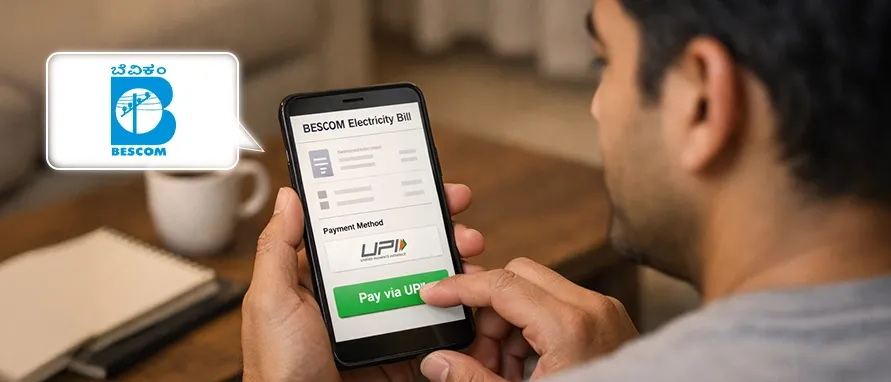
Table of Contents
BESCOM or Bangalore Electricity Supply Company Limited is responsible for supplying and distributing electricity in Bangalore. Chances are, if you live within the limits of the city, your electricity is supplied by BESCOM. With increased reliance on a range of gadgets and devices, it's more important than ever to have reliable power. This is only possible if you pay your electricity bills on time and consistently.
Today, there are many options available to make your BESCOM bill payment on time. In fact, with the rolling out of the BESCOM online bill payment feature, people in the city have found it easier to pay their electricity charges conveniently, thanks to BESCOM online payment.
Bajaj Markets provides you with a secure and reliable platform to pay your BESCOM bill fast. Make your BESCOM bill payments on time to avoid being charged penalties and late fees by the Bangalore Electricity Supply Company Limited (BESCOM). The platform is entirely secure and user-friendly. You can even pay while you're out and about.
Here is a step-by-step guide to show you how you can pay your electricity charges from BESCOM online, using the UPI payments -
Download the Bajaj Markets app from the iOS store or from the Google Play store, depending on your phone’s OS.
Login with your date of birth, mobile number and the OTP sent to it.
On the home page, click on the ‘Bill Pay’ button.
Select the ‘Electricity’ option.
You will then see a long list of billers and electricity providers from all over India.
Select your provider from this list. In your case, this would be the Bangalore Electricity Supply Company Limited or BESCOM.
Enter your consumer ID and click on the button labelled View Bill’ to proceed.
If your bill has been generated, you will be able to view the amount, along with payment options. Take a look at the picture below to get a better idea of the screen you’ll see.
To pay your BESCOM bill online via UPI, simply select the payment method of your choice and make the payment. Your BESCOM online bill payment is complete!
Payment of BESCOM electricity bill payments has now been made easier and faster than ever, thanks to the Bajaj Markets app. By making BESCOM bill payments on Bajaj Markets, you get the option to enjoy BESCOM bill payment offers. That said, the advantages don’t just end there with that, though. Here’s a quick look at a few other reasons why you should pay the BESCOM bill on Bajaj Markets.
Keeping track of your BESCOM electricity bill is far more accessible with the Bajaj Markets app. All that you would have to do is open the app on your smartphone and navigate to the electricity bill payment section.
You can make your BESCOM bill payment instantly through UPI from the Bajaj Markets app. It takes only a couple of minutes. That’s not all. You also get to enjoy BESCOM bill offers for each payment as well.
With the Bajaj Markets, you can access your BESCOM electricity bill and make payments at any time of the day from almost anywhere in the world. You get complete 24/7 accessibility.
The user interface of the Bajaj Markets app is simple and easy to understand. No more going through endless menus.
All of the BESCOM online bill payment transactions that you make through the Bajaj Markets app are completely encrypted and secure.
If you want to make your BESCOM bill payment online, there are different options for you to choose from. For example, you can do this by logging into the BESCOM portal. In fact, using the BESCOM online portal is one of the easiest ways to pay your electricity bill on time. Aside from the BESCOM website, you can also use the BESCOM app to make your payments.
Payment Method |
Description |
Mobile Apps |
This is one of the easiest ways to make your BESCOM payment. For instance, payment through the Bajaj Markets app falls under this category. |
BBPS (Bharat Bill Payment System) |
The NPCI (National Payments Corp of India) launched the BBPS in collaboration with the RBI. Through this payment system, you just need to enter the PIN code of your area to see the different outlets where you can make your BESCOM bill payment. |
Standing Bank instructions |
If you’re an individual who prefers to make automatic electricity bill payments, you can always issue a standing instruction to your bank. |
Net banking |
You can also use the good, old net banking portal of your bank to make electricity bill payments. |
BESCOM cheque payment |
BESCOM also allows you to make payments via cheques. All cheques should be in favour of Bangalore One, and they must belong to any bank that is recognized by the RBI. |
Mobile Wallet |
If you’re a mobile wallet user, you’d be glad to know that you can make your BESCOM bill payment using your wallets. |
BESCOM online bill payment by debit card |
You can make your BESCOM online bill payment by debit card too. Simply enter the card details and codes just like you do for regular payments. |
BESCOM bill payment by credit card |
If you prefer making payments through credit cards, you can use this option to pay your BESCOM bill. |
There are two easy ways to check your BESCOM bill online. The first would be through the BESCOM website itself, and the second option for checking your BESCOM bill status is through the Bajaj Markets app.
Head to the official website of BESCOM, and click on the ‘View Bill’ option under the Track Online section. Then, enter your user ID and password to see your bill.
BESCOM Home Page |
|
BESCOM View Bill Portal |
https://bescom.co.in/SCP/General/ServiceDescription.aspx?ServiceType=ViewBill |
BESCOM Last Transaction Status |
https://bescom.co.in/SCP/MyAccount/LastTransactionStatus.aspx |
Click on the dropdown menu on the homepage of the Bajaj Markets app. Select ‘Bill Pay’ and choose your electricity provider. Enter your consumer number to view your bill payment history and payment status in full.
To find your BESCOM consumer number, all that you would need to do is take a look at your physical electricity bill. Your BESCOM customer number will be displayed right at the top.
To check your BESCOM electricity bill, follow this link https://bescom.co.in/SCP/Myhome.aspx and log into your account using your credentials.
You don’t have to calculate your BESCOM electricity bill manually at all. You can simply view the final bill amount by visiting the electricity bill payment section of the Bajaj Markets app, selecting BESCOM from the list, and entering your BESCOM consumer ID.
If you’ve already made the payment, simply visit the following link https://bescom.co.in/SCP/Myhome.aspx and log into your BESCOM account to download the payment receipt.
To check the status of your BESCOM electricity bill, follow this link https://bescom.co.in/SCP/Myhome.aspx and log into your account using your user credentials. Alternatively, you can also use the Bajaj Markets app to check the status as well.
In case you need any help, you can always dial the BESCOM contact number for customer support. To get in touch with customer care, you could call the BESCOM number 1912. This BESCOM customer care number is a 24/7 helpline.


Most Viewed

Academy by Bajaj Markets

 47202
47202

Navigate the tax maze with ease! Uncover Income Tax 101, demystify jargon with Terms for Beginners, and choose between Old or New Regimes.
 165541
Unlock the world of credit! From picking the perfect card to savvy loan management, navigate wisely.
 97881
97881
Money Management and Financial Planning covers personal finance basics, setting goals, budgeting...
 28606
28606
Explore the investment cosmos! From beginner's guides to sharp-witted strategies, explore India's treasure trove of options.
 18764
18764
Discover essential insights on various types of insurance in India.
 4584
4584
Welcome to Tech in Finance, where we explore the exciting intersection of technology and finance...











 Academy




