
Our Products
 Loans
Loans
 Cards
Cards
 Insurance
 Investment
 Stock Market
 Electronics Mall
 CIBIL Score
 Knowledge Centre
 Calculators
Our Services

 Do not call
 En
En
 We don’t spam
Resend OTP
We have some offers for you.
 100% safe and secure
Understand the different ways to log in to your SBI Card account safely and manage payments, statements, rewards, and card services online.
Last updated on: Sep 23, 2026
Managing your SBI Credit Card online can make tracking expenses and payments more convenient. SBI Card offers secure digital login options through its official website and mobile app, allowing you to view statements, pay bills, redeem reward points, and monitor transactions. Understanding the correct login steps and security measures can help you access your account smoothly while protecting your personal and financial information.
You can use SBI Card’s official digital channels to access your SBI credit card account securely. Below are the supported ways and exact step-by-step actions required:
Use the SBI Card website to sign in with relevant details and complete OTP verification.
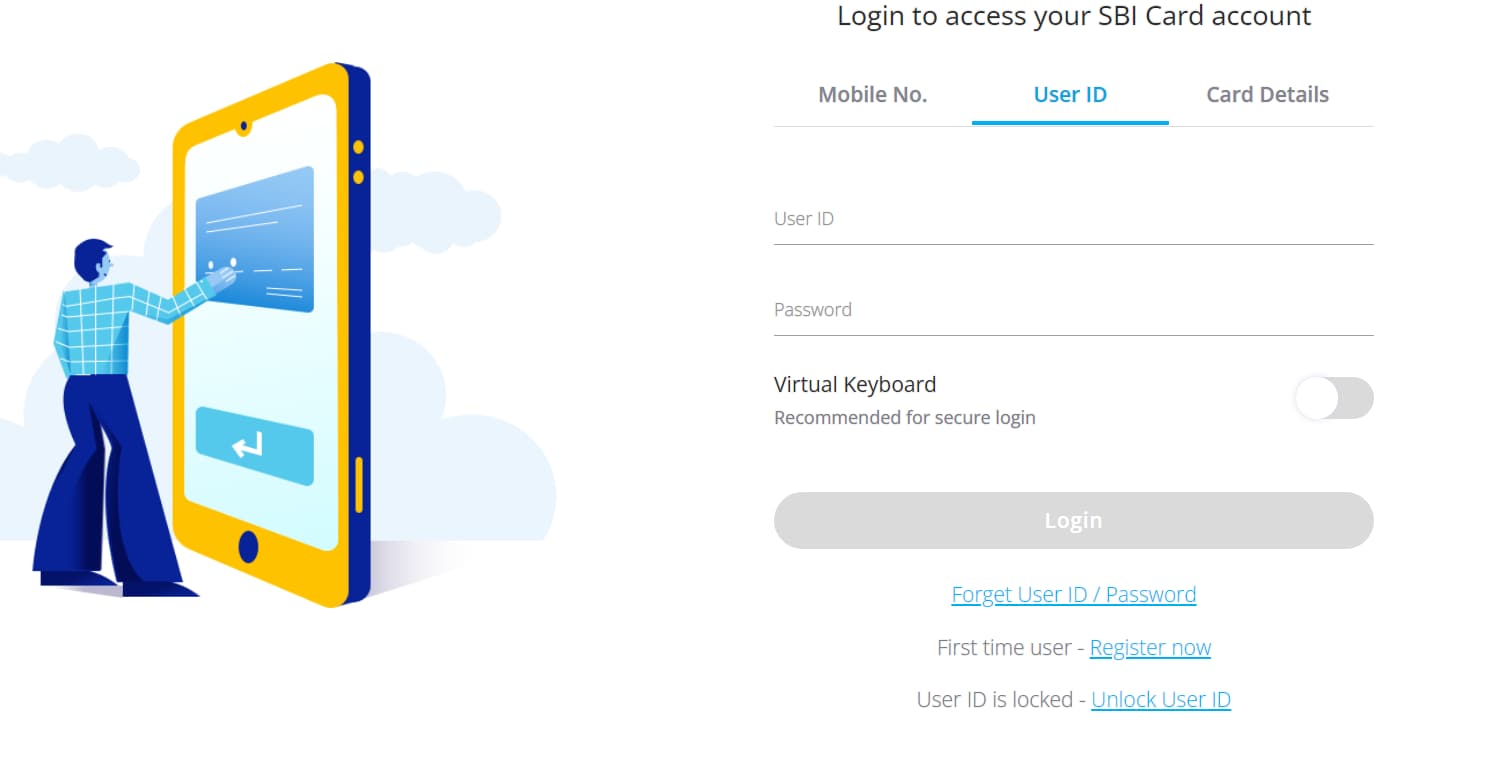
Go to www.sbicard.com and click on ‘Login’ from the top right corner.
On the next page, you can log in with your user ID, mobile number, or card details.
Choose the suitable option and verify the on-screen authentication steps if prompted.
Enter your Password (if you choose to log in with your user ID) and click on ‘Proceed’.
You will be asked to generate an OTP sent to your registered mobile number and/or email.
Enter the OTP to enter the online dashboard.
Here, you can view your statements, payments, rewards and other services.
Use the SBI Card website to register if you have never created online credentials:
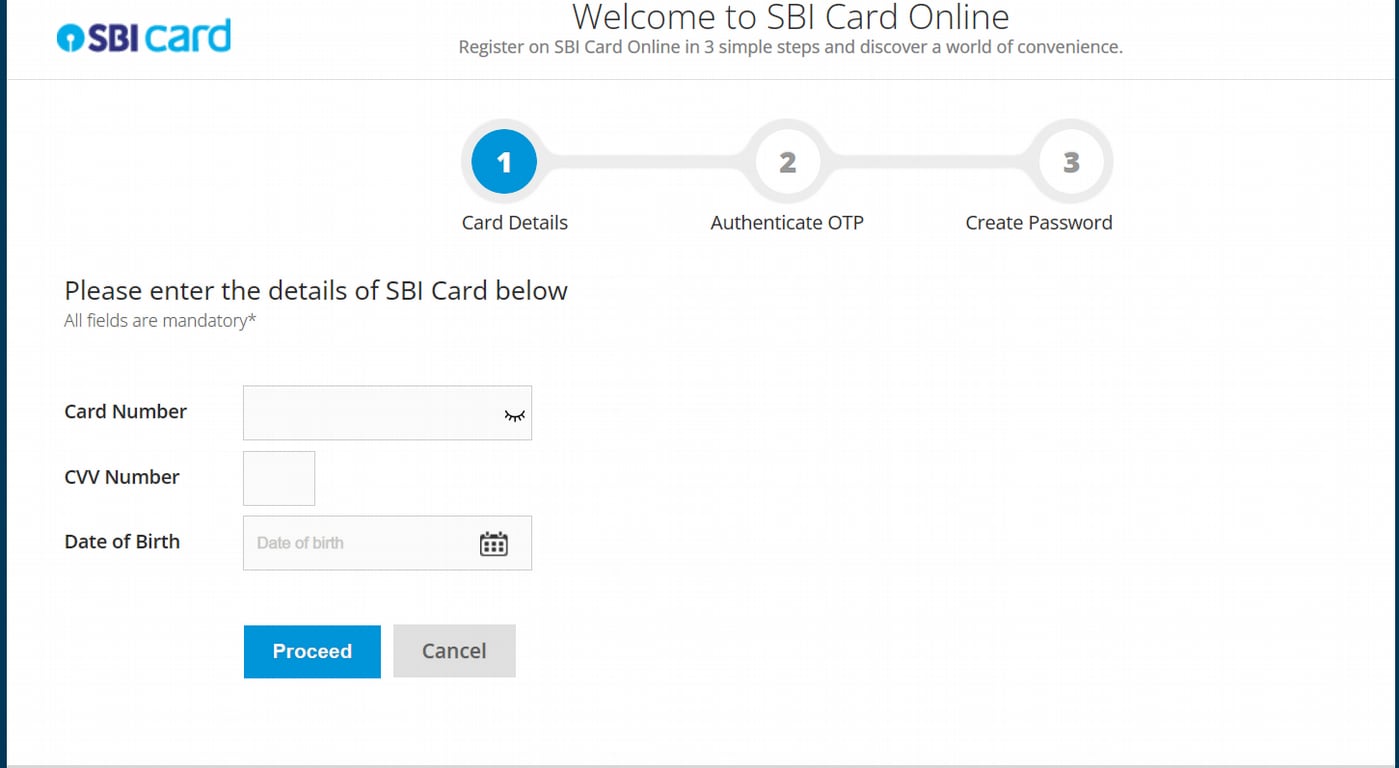
Go to www.sbicard.com and click on the ‘New User? Register Now’ option.
Enter your primary card number, CVV, date of birth, and click on ‘Proceed’.
Enter the OTP sent to your registered mobile number and email to continue.
Choose a user ID and password, confirm them and complete registration.
You can use these credentials next time to log in to your SBI Card account.
Use the SBI Card mobile app to log in with your existing credentials:
Open the app and tap on ‘Login’. Enter your user ID and password to continue.
You will receive an OTP on your registered mobile number /email
Enter the OTP and set the device name for device linking.
Set an M-PIN and enable Touch ID / Face ID if your device supports it.
After this, you can use MPIN or biometrics for quick secure logins.
Use the SBI Card mobile app to register on your smartphone and enable quick login methods:
Download the SBI Card Mobile App from the Google Play / App Store.
Tap on the ‘Sign-Up’ option and enter your card number, CVV and date of birth
Click on Generate OTP, then enter the OTP received on your registered number.
Link your device and choose a suitable User ID and Password to log in to your profile.
After first login you can set an M-PIN and enable Touch ID / Face ID (biometrics) for faster future access.
You can use SBI Card’s official website and mobile app to access a full set of net-banking facilities for your credit card. Below are the main services available and how to use them.
Use the SBI Card website or mobile app to check your statements, unbilled and posted transactions, and available limits in real time.
Log in to sbicard.com or open the SBI Card app.
Tap on ‘View Card Statement or Account Summary’ to download or view monthly statements and unbilled transactions.
Use date filters on the app/website to review transaction history and export a duplicate statement if needed.
Use SBI Card’s Pay options on the site or app to settle outstanding amounts via multiple digital routes.
On the app or sbicard.com, choose ‘Pay Now’ / ‘Pay Online’.
Select a payment method like NEFT/IMPS, UPI/QR, debit card, or SBI Pay channels (including YONO/Paynet)
Enter the amount (total due or minimum due) and confirm to continue.
Check the payment posting TAT and keep the transaction reference for records.
Use the Flexipay (Convert to EMI) option on the website or app to convert large purchases or eligible transactions into instalments.
Go to the ‘Convert to EMI’ / ‘Book Flexipay’ option on the app or website.
Select the transaction(s) you want to convert, choose tenure and review charges.
Confirm the conversion and note the EMI schedule and processing fees.
You can also request balance-transfer-on-EMI or other instalment products from the same menu.
Use the Rewards section on sbicard.com or the mobile app to view, set redemption goals, and redeem points with partners or catalogue offers.
Open the ‘Rewards’ / ‘Know your Reward Points’ in the app or site.
See your points summary and available redemption options (catalogue, partner redemptions, travel e-store).
Select an option, confirm redemption and follow any partner booking/payment flows.
Use the quick-action on the app or the website to immediately block a lost/stolen card and request replacement or re-issue.
In the app or on sbicard.com, tap on ‘Report Lost Card’ / ‘Block Card’.
Confirm card details and state your reason; the system will block the card instantly.
Request a replacement/reissue and track the service request status online.
You can also manage PIN operations from the same menu.
Before you go ahead with your SBI credit card login, you need to complete the SBI net banking registration. Follow these simple steps to get started:
Go to www.sbicard.com and click on the ‘New User? Register Now’ option.
Enter your credit card number, CVV, expiry date, date of birth, and click on ‘Proceed’.
Enter the OTP sent to your registered mobile number and email to continue.
Choose a user ID and password, confirm them and complete the registration.
After this, you can use your username and password to log into your SBI Credit Card net banking account. You can also use these credentials to generate an SBI Credit Card PIN online.
If you forget your SBI Credit Card login password, you can reset it. The steps for the same are as follows:
Log into your credit card net banking account through the SBI Card website
Select ‘Forgot User ID or Password’
Fill in your credit card number, CVV, and birthdate
Enter the OTP you must have received via SMS
You will now be able to reset your password.
You can use SBI Card’s official digital channels to diagnose and fix common login problems. Here are some common issues and short, actionable steps for each to follow.
Here are the steps to unlock your SBI Card User ID to restore access quickly.
Go to the Unlock page, enter primary card number, CVV and DOB, then authenticate with OTP and reset your password.
If unsuccessful, the account may auto-unlock after 24 hours or you can call SBI Card support for immediate help.
You can use the on-screen ‘Resend OTP’ option and confirm your registered contact details.
Verify your registered mobile number and email, then tap Resend OTP (you may request OTP up to the allowed retries).
If still not received, check network/SMS settings, try again after restarting the device, or contact the helpline to confirm/ update contact details.
Try these simple device and app/browser checks before contacting SBI Card support.
Try a different browser or device, clear browser cache/cookies, or update/reinstall the SBI Card mobile app.
If errors persist, note the exact error message or screenshot and contact SBI Card support for resolution.
Paying your SBI credit card bill via net banking can be done instantly on the official SBI Card website in a number of ways:
Pay via NEFT from any bank account using SBI Card’s dedicated beneficiary details.
Log in to your bank’s netbanking or mobile banking.
Add a beneficiary using the correct IFSC code: SBIN00CARDS and your SBI Card number. Remember to follow your bank’s beneficiary process.
Initiate NEFT for the outstanding amount and keep the transaction reference for confirmation.
Use Paynet to pay directly through your bank’s net-banking portal without adding beneficiaries.
On sbicard.com, choose ‘PAYNET-Pay Online’ or use the Paynet link.
Select your bank from the list; you will be redirected to your bank’s net-banking page.
Authorise the payment in your bank’s interface; note the reference and check posting TAT.
You can also use your bank’s net-banking facility to transfer funds to any SBI Visa credit card.
From your bank’s transfer/payee options choose the ‘Credit Card Payment’ or ‘Card’ transfer type (naming may vary by bank).
Enter your SBI Visa credit-card number and the amount, then authenticate per your bank’s flow.
Retain the transaction ID and confirm posting in your SBI Card statement.
Set a standing instruction to auto-debit due amounts from your bank account on the payment due date.
Register a standing instruction (NACH mandate) either via your bank’s net-banking (auto-debit instruction) or through your SBI Card’s account.
Log in to your account, go to the ‘Service’ section from the dashboard and select the ‘NACH’ tab
Specify the amount type (minimum, total due, or fixed amount) and the start date/tenure as required.
From the registration page, check the pre-filled details and enter your banking data. Complete the steps and authenticate the mandate form successfully.
Monitor the mandate status and keep an eye on the first debit to confirm correct setup.
You can change your SBI credit card PIN online, from the SBI Card website or mobile app. This process is instant and secure for managing your card's security.
Log in to your account on the SBI Card website and click on the 'Menu' option on the top left corner.
Select 'My Account' and then choose 'Manage PIN'. Select the credit card for which you want to change the PIN.
Click on 'Generate OTP' and enter the OTP received on your registered mobile number.
Enter your new 4-digit PIN twice and click 'Submit'.
Open and log in to the SBI Card mobile app.
Go to the 'Services' section in the menu.
Select 'Manage PIN' or 'Change PIN'.
Select the card, enter the OTP, and set the new 4-digit PIN.
You can check your SBI credit card statement online through the official website or mobile app. and view/download statements for the last 24 months.
Log in to sbicard.com using your User ID and password.
Click on ‘View Statement’ on the dashboard, or go to ‘My Account', then click om ‘Card Statement.
Select the desired month and click ‘Download’ to save the PDF.
Log in to the app.
Select ‘Menu’, go to ‘My Account’, then ‘Card Statement’.
View or download your latest or previous statements.
Note that SBI sends a monthly statement to your registered email address. You can also subscribe to these e-statements via the ILA chatbot or website settings.
To ensure your SBI Credit Card login remains secure, follow these essential security practices:
Direct URL Entry: Always type the official URL sbicard.com directly into your browser's address bar. Avoid clicking on links in emails, SMS, or social media.
Verify Secure Connection: Ensure the website address begins with https:// and look for the padlock icon in the browser bar to confirm a secure, encrypted connection.
Check Last Login: Always verify the ‘Last Login’ date and time displayed after logging in to monitor for any unauthorised access.
Complex Passwords: Create a strong password (at least 12 characters) using a mix of uppercase, lowercase, numbers, and special characters.
Frequent Updates: Change your login password periodically (e.g., every 90 days) and ensure it is different from your last five passwords.
Confidentiality: Never share your User ID, Password, PIN, CVV, or OTP with anyone. SBI will never ask for these details via phone, email, or SMS.
Avoid Public Networks: Never log in to your credit card account using public Wi-Fi or computers in cyber cafes.
Disable Auto-Save: Do not allow your browser or device to ‘Save Password’ or ‘Remember Me’ for banking sites.
Manage Mobile Apps: Only use the official SBI Card App and avoid installing remote access apps like AnyDesk or TeamViewer, which fraudsters can use to see your screen.
SBI Credit Card login and SBI Net Banking login operate on separate portals, each designed to manage distinct financial services and account functions.
Parameter |
SBI Credit Card Login |
SBI Net Banking Login |
Primary Purpose |
Exclusively for managing SBI credit card accounts and related services |
For accessing personal or corporate banking services |
What You Can Manage |
Credit card transactions, statements, bill payments, reward points, EMI requests, and card controls |
Savings/current accounts, fund transfers, deposits, and other banking operations |
Login Credentials |
User ID & Password, or Mobile Number & Card PIN (as applicable) |
Username and Password for personal or corporate internet banking |
Registration Process |
Requires credit card number, CVV, and date of birth for first-time setup |
Requires account details and internet banking activation through SBI |
Key Features |
View billing date, download statements, convert transactions to EMI (Flexipay), redeem rewards, block/replace card |
NEFT/RTGS/IMPS transfers, utility bill payments, open FD/RD, request chequebooks |
Access Platforms |
SBI Card website and SBI Card Mobile App |
SBI Online portal (onlinesbi.sbi) |


Reviewer
You can make SBI Credit Card bill payments using the net banking facility. You must first register for net banking, which allows you to use the net banking service to transfer funds, make bill payments, etc.
Yes, the SBI card login/net banking service is safe, and you can use it to manage and make payments towards your SBI Credit Card.
The user ID for the SBI Credit Card net banking service is a unique ID you generate at the time of SBI net banking online registration. This user ID and set password are needed to complete the SBI Credit Card net banking login step.
In case of unforeseen circumstances, such as loss or theft of your SBI Credit Card, you can block your credit card. To do so, visit the SBI Credit Card page and log in using your credentials. Under the ‘Requests’ tab, find and click the ‘Report Lost/Stolen Card’ option. Choose the relevant card number you wish to report and click ‘Reissue Card’ if you want the card reissued. Click ‘Submit’, and the bank will block your credit card.
There are different ways to activate your SBI Credit Card. For instance, you can visit the SBI card login page and simply login to your SBI Card account to activate your credit card. Alternatively, you can even call the bank’s helpline number to activate your card or write to them at www.sbicard.com/email.
Another way to activate your card is to login to Chatbot ILA with your online account user ID and password.
You can track your SBI Credit Card application either online or offline. If you wish to do this online, you can visit the bank’s website and enter your card application number and reference number to check the application status instantly. Alternatively, you can also contact the SBI Credit Card customer care at 1800-180-1290 to enquire about your credit card application status.
You cannot typically redeem your credit card reward points against cash. You can only use your SBI card login to redeem your points against the products or services in the predetermined catalogue or use them to pay the outstanding amount on your card. However, the bank offers an alternative if you want to redeem your reward points for cash. You need to write to the bank at www.sbicard.com/email or call the helpline number for further assistance on the same.
You do not need to use your SBI card login to close your credit card account. You can close your SBI Credit Card by writing to the bank via email. You can also call the bank’s helpline number. Terminating your primary credit card will also terminate any add-on cards attached to it. However, the account closure will only be done after the bank has ensured that all outstanding dues have been paid.
You can tap into a wide range of facilities through SBI Card’s net banking facilities. You can apply for a credit card online, complete transactions seamlessly, access crucial financial information, etc.
Register on sbicard.com using the ‘First time user – Register now’ link and enter your primary card number, CVV and date of birth. Verify the OTP sent to your registered mobile or email and create a User ID and password to complete online registration.
Click on ‘Forgot User ID / Password’ on the sbicard.com login page, provide your card number, CVV and date of birth, then generate an OTP. Authenticate with the OTP sent to your registered mobile/email and set a new password to regain access.
Login failures often stem from an account lock after repeated incorrect attempts, wrong user ID/password, mismatched authentication image/text, or OTP issues and device/browser problems. Use the ‘Unlock User ID’ option, verify registered contact details, clear cache or try another browser/device, and contact the helpline if the problem continues.
On sbicard.com select ‘Pay Now’ and choose from payment routes such as NEFT, Paynet-Pay Online, NACH Mandate, etc. Follow the selected gateway’s instructions to complete payment. Keep the transaction reference and allow the stated posting time for the payment to reflect on your account.
Generate or reset your card PIN via sbicard.com’s ‘Manage PIN’ service or through the SBI Card mobile app by authenticating with card details and OTP. You can also generate/change PIN via the bank’s IVR or at an SBI ATM as described in SBI Card’s PIN generation guidance.
Log in to sbicard.com or the SBI Card mobile app and choose ‘View Card Statement’ or ‘Account Summary’ to view or download monthly statements. The portal provides up to 24 months of statements, PDF export and an e-statement subscription option.
SBI Card uses layered protections to secure access. These include authentication image/text, OTP verification, virtual keyboard for password entry and device-linking on the app. Always confirm the authentication image, never share OTP/password/CVV, and contact the helpline immediately if you suspect unauthorised activity.
No, sbicard.com (or the SBI Card app) and onlinesbi.sbi are separate portals. The former is for credit-card management while the latter is for bank-account services such as savings, transfers and deposits. Use each portal for its respective services to avoid confusion.
No, your SBI internet-banking username and password for onlinesbi.sbi cannot be used on sbicard.com. To access SBI Card online use your SBI Card User ID & password, registered mobile number with card PIN, or card details plus OTP as supported on the SBI Card login page.






 Academy




