BAJAJ FINSERV DIRECT LIMITED
Payments Insight

How To Add Credit Card on Flipkart: Step-by-Step Guide

authour img
Roshani Ballal

Table of Contents

How to Add Credit Card on Flipkart Using Mobile App

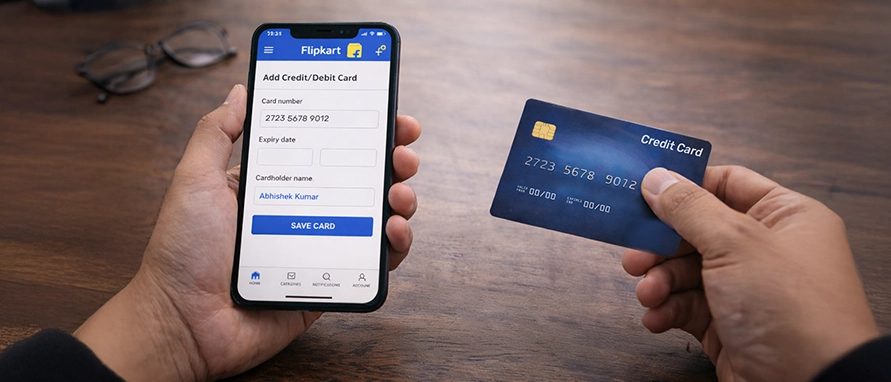
Adding a card in the Flipkart app lets you pay faster on future orders and unlock bank offers and EMI plans. Follow these simple steps to add a credit card to your Flipkart account from your phone:

Steps

  1. Open the Flipkart app and log in to your account
  2. Tap Account (bottom right) and go to Payments or Saved Cards & Wallets
  3. Select Add a new card or Add credit/debit card
  4. Enter your card number, expiry date, cardholder name, and CVV
  5. Tap Save & Continue
  6. Complete OTP verification sent by your bank to authenticate the card
  7. Once verified, your card is saved and ready to use for purchases and EMIs

You can now use this saved card for one-tap payments whenever you shop.

How to Add Credit Card on Flipkart Website

If you prefer desktop shopping, you can add card details in Flipkart just as easily through the website.

Steps

  1. Visit flipkart.com and log in

  2. Click your profile icon and select Payments or Saved Cards

  3. Choose Add New Card

  4. Enter your credit card details accurately

  5. Click Save and complete the secure OTP sent by your bank

  6. After verification, the card will appear under your saved payment methods

This is the quickest way to add a new credit card in Flipkart for future desktop purchases.

How to Add a Credit Card During Checkout on Flipkart

You can also add a credit card to Flipkart while placing an order.

How it works

  1. Add items to your cart and proceed to Checkout

  2. On the Payment screen, select Credit Card

  3. Enter your card details and tick Save this card for future payments

  4. Verify using the OTP sent by your bank

  5. Complete the order

Your card is now saved and linked to your Flipkart account for the next purchase.


Why Add a Credit Card to Your Flipkart Account?

Maximize your shopping experience by saving your card details. It’s not just about speed; it’s about smarter spending.

  • Lightning-fast Checkout: Skip the manual entry. Enjoy one-tap payments and never miss out on limited-time flash sales
  • Exclusive Bank Rewards: Instantly unlock card-specific discounts, 10% instant bank offers, and accelerated reward points
  • Budget-friendly EMIs: Turn big-ticket dreams into affordable reality with Easy EMI options available only on saved cards
  • Ironclad Security: Your data is protected by RBI-compliant Tokenization and end-to-end encryption, ensuring your details never fall into the wrong hands
  • Effortless Shopping: Ideal for recurring subscriptions and repeat ‘Buy Again’ orders with zero friction

Common Issues While Adding Credit Card on Flipkart

You might face a few hiccups while trying to add my credit card in Flipkart. Here’s how to resolve them:

  • OTP not received: Check network or try resend.
  • Incorrect details: Re-enter card number, expiry, and CVV carefully.
  • Unsupported card: Some international or niche cards may not be accepted.
  • Gateway error: Wait a few minutes and retry.
  • Bank authentication failure: Contact your card issuer.

How to Remove or Update Credit Card Details on Flipkart

To keep your account secure, you can delete or update saved cards anytime.

Steps

  1. Go to Account > Payments > Saved Cards.

  2. Choose the card you want to remove or edit.

  3. Tap Delete to remove it or Edit to update expiry date.

  4. Confirm with OTP if prompted.

Supported Credit Cards on Flipkart

Flipkart accepts major Indian credit cards across networks like Visa, Mastercard, RuPay, and American Express. Most cards from leading banks support regular payments and no-cost EMI options, subject to eligibility and ongoing offers.

Tips to Manage Saved Credit Cards on Flipkart

Saving a card is convenient, but staying secure is non-negotiable. Follow these five golden rules to protect your digital wallet on Flipkart:

  • Fortify Your Access: Use a unique, complex password for your Flipkart account and must enable Two-Factor Authentication (2FA). This ensures that even if someone knows your password, they can't access your saved cards.
  • Perform a Digital Cleanup: Periodically audit your ‘My Cards’ section. Remove any expired or rarely used plastic to reduce your digital footprint.
  • Stay Private: Never select ‘Save Card’ when shopping from a public computer, office desktop, or a friend’s phone. Keep your financial data on devices you own.
  • Monitor Your Money: Set up instant SMS/email alerts for your bank account. Regularly cross-reference your bank statements with your Flipkart ‘Order History’ to spot discrepancies early.
  • Take Control of Auto-Save: If you prefer manual control, head to Account Settings to disable the ‘Auto-save new cards’ feature. This ensures only specific cards you choose stay on the platform.

Frequently Asked Questions

Credit Card

Can I save multiple credit cards on Flipkart?

Yes, Flipkart allows you to save several cards so you can choose any at checkout.

Yes, Flipkart uses encrypted payment gateways and OTP-based bank authentication for security.

Go to Account > Payments > Saved Cards, select the card, and tap Delete.

Most Indian Visa, Mastercard, RuPay, and AmEx cards are supported, subject to bank approval.

Some international cards may work, but acceptance depends on bank and network restrictions.

It could be due to incorrect details, OTP failure, bank blocks, or temporary gateway issues.

View More
writer-img-alt
Hi! I’m Roshani Ballal
Financial Content Specialist
writer-img-alt

Roshani has over 6 years of experience and has honed her skills in performance content marketing in the financial domain. She loves diving into research and has crafted and overviewed creative copies, long-form financial content, engaging blogs, and informative articles. She specialises in delivering user-oriented content and solving problems through various content formats. On the side, Roshani enjoys writing poems-that's how she stays creative when she is not crunching numbers.

Most Viewed

2 Min Read | Posted on 21 Mar


Academy by Bajaj Markets

academy-thumbnail-alt
eye icon 162730
share icon

All Things Credit

Unlock the world of credit! From picking the perfect card to savvy loan management, navigate wisely.

Seasons 12
Episodes 56
Durations 3.0 Hrs
academy-thumbnail-alt
eye icon 97438
share icon

Money Management and Financial Planning

Money Management and Financial Planning covers personal finance basics, setting goals, budgeting...

Seasons 5
Episodes 19
Durations 1.1 Hrs
academy-thumbnail-alt
eye icon 28563
share icon

The Universe of Investments

Explore the investment cosmos! From beginner's guides to sharp-witted strategies, explore India's treasure trove of options.

Seasons 5
Episodes 23
Durations 1.5 Hrs
academy-thumbnail-alt
eye icon 45886
share icon

All Things Tax

Navigate the tax maze with ease! Uncover Income Tax 101, demystify jargon with Terms for Beginners, and choose between Old or New Regimes.

Seasons 6
Episodes 25
Durations 1.3 Hrs
academy-thumbnail-alt
eye icon 18752
share icon

Insurance Handbook

Discover essential insights on various types of insurance in India.

Seasons 2
Episodes 6
Durations 0.5 Hrs
academy-thumbnail-alt
eye icon 4582
share icon

Tech in Finance

Welcome to Tech in Finance, where we explore the exciting intersection of technology and finance...


Seasons 1
Episodes 5
Durations 0.3 Hrs
Home
Home
ONDC_BD_StealDeals
Steal Deals
Free CIBIL Score
CIBIL Score
Free Cibil
Explore
Explore
chatbot
Yara AI