
Our Products
 Loans
Loans
 Cards
Cards
 Insurance
 Investment
 Stock Market
 Electronics Mall
 CIBIL Score
 Knowledge Centre
 Calculators
Our Services

 Do not call
 En
En
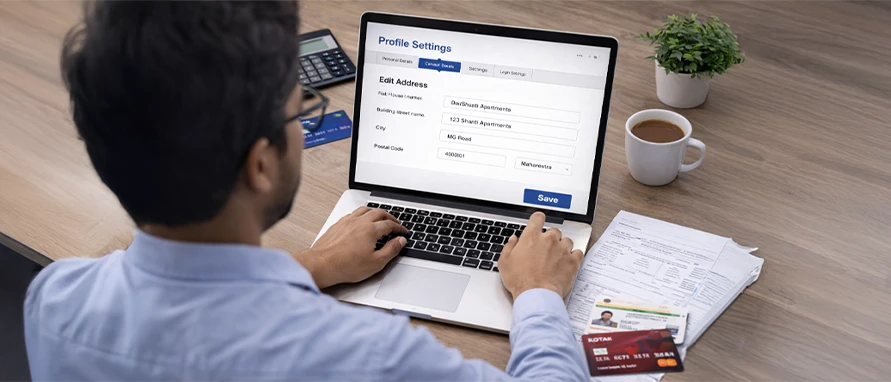
Table of Contents
Learn how to change address in Kotak credit card using online and offline methods. Check the documents needed, timelines, and key tips before you proceed.
Kotak Mahindra Bank credit card holders may need to update their address when they move homes, change cities, or shift offices. Keeping your address updated helps ensure that statements, OTP-related communication, and replacement cards reach the correct location and improves overall account security. Kotak allows customers to update communication or mailing address using online channels such as net banking, subject to authentication. Those who prefer physical interaction may use branch-based options with valid address proof.
Keeping the correct address in your Kotak credit card records is important for smooth communication, compliance, and security.
Kotak Mahindra Bank sends important communication such as statements, alerts, and notices to the registered mailing address. So, an outdated address might lead to missed information and delayed action on dues.
A correct address also helps ensure new or replacement cards and PIN mailers are sent to the right location, reducing the risk of them reaching someone else.
Address details form part of your KYC and customer profile. So, keeping them updated supports regulatory compliance and reduces the chance of service restrictions due to incomplete details.
When your address matches your documents and records, it may also make dispute resolution, card reissue, and chargeback processes smoother.
Updating your address promptly may therefore help prevent fraud, loss of sensitive mail, and confusion about your account.
You can update your correspondence address online through Kotak Mahindra Bank’s official digital channels. The process is simple and can be completed through their NetBanking process. Below is a clear step-by-step guide you can follow:
This is one of the most direct ways to change your credit card correspondence address.
If you are unable or uncomfortable using online banking, you may update your Kotak credit card address through offline channels. Offline methods rely on physical verification of documents and manual processing by bank staff. Below are clear, practical steps for the offline method:
This is the most traditional offline method where you have to visit a nearby Kotak Mahindra Bank branch.
Locate the nearest branch using the bank's official branch locator.
Carry your original Aadhaar card or any other valid address proof along with a photocopy.
Request the representative for a Kotak credit card address change form.
Fill out the form as dictated, sign it, and attach your self-attested document copies.
Submit the form at the help desk. Ensure you get an acknowledgment receipt or a reference number for your visit.
If you want to update your address only for your Kotak Mahindra Bank credit card, you can also do so through their customer care channel.
Contact the bank’s 24×7 customer helpline at 1860-266-2666 (standard call charges apply) and describe your request. Once accepted, the update usualy gets processed in six working days.
Note: Once your correspondence address is changed, you’ll be able to update it on the platform only after six months from the last update.
If you choose the offline route, filling the form correctly is crucial to avoid rejection. You can usually find the Kotak credit card address change form at any branch or download it from the 'Forms and Resources' section of the official website.
To update your residence or correspondence address for a Kotak Mahindra Bank credit card, you must submit a self-attested scanned copy of any one valid address proof in your name. The document should clearly display your full name and updated address details.
You can submit any one of the following documents:
Passport
Aadhaar Card
Driving Licence
Voter ID Card
NREGA Job Card
Letter issued by the National Population Register
Ensure that the copy is self-attested, meaning you must sign the document before scanning or uploading it.
Currently, only one attachment can be uploaded per request.
If you need to submit multiple documents or images, combine them into a single file and upload them together.
If you have already raised a request through a branch or phone banking, mention the reference number while submitting the form.
Provide your registered mobile number and email ID when filling out the request.
If you need to share multiple documents, the bank recommends using NetBanking.
Submitting an Aadhaar card is voluntary, not mandatory.
Once your request is registered, Kotak Mahindra Bank will send a reference number to your registered email ID. After the bank receives and verifies the required documents, your address update request will be processed. The status will be communicated to your registered email ID.
Processing time for Kotak credit card address change may depend on the channel used and successful verification of your documents.
Once the Kotak credit card address update is completed successfully, you will usually receive a confirmation SMS and an email on your registered contact details. It is a good practice to log in to your app after a week to verify if the new address appears in your profile section. If you do not see the change reflected within the stipulated timeframe, you can contact customer care or revisit the branch to check the status.
Sometimes, a request to change Kotak credit card address might face hurdles. Being aware of these can help you avoid them.
If you are uploading a photo of your document, ensure there is no glare and all text is readable. Blurred images are a common reason for rejection in the Kotak credit card address change online process.
If the name on your address proof does not exactly match the name on your bank account (for example, due to a spelling error or marriage), the bank might reject the request. You might need to provide a marriage certificate or an affidavit in such cases.
In rare instances, if you move to a very remote location that the bank's courier partners do not serve, you might face issues receiving physical cards.
For offline requests, if your signature on the Kotak credit card address change form does not match the bank's records from when you first opened the account, the request will likely be declined for security reasons.
Leaving sections blank or forgetting to self-attest the photocopies of your documents can lead to unnecessary delays.
If you have complex queries or your address update request is stuck for a long time, you can reach out to the bank’s official support channels.
By following these steps and using the official channels, you can ensure that your Kotak credit card address update is handled smoothly. Always remember to use official bank links and avoid sharing your OTP or passwords with anyone claiming to be a bank official.
Kotak accepts government-issued address proofs like Aadhaar (via number & OTP), passport, driving licence and voter ID. They may accept utility bills for address updates as secondary documents. You can upload scanned proof through NetBanking/Mobile Banking or submit originals at a branch as per the bank’s Kotak’s process.
Address changes using Aadhaar verification (number + OTP) or online channels are effective instantly or within minutes, while uploading address proof normally updates within one working day. Offline or customer care requests can take longer, sometimes several days to a few weeks depending on verification.
Yes, you can update your credit-card correspondence address via Kotak’s Mobile Banking app or NetBanking. Aadhaar+OTP options update instantly and proof upload may take a working day. You can use the app’s Profile / Update Contact Details or the Credit Card service flow to make the change.
Yes, most address updates can be completed online through NetBanking or Mobile Banking using Aadhaar OTP or by uploading address proof. So, a branch visit is not normally required. Branch submission remains available if you prefer offline processing or for specific account types that need in-person verification.
Updating your correspondence address determines where Kotak will send physical credit cards, paper statements and courier communications. New cards and re-dispatches are delivered to the registered address on record. Keeping the address current helps avoid failed deliveries and the need for re-dispatch requests or related delays.
Yes, Kotak treats the communication (correspondence) address separately from KYC/permanent address. The bank allows online updates to the correspondence address via NetBanking/Mobile Banking. Some online changes may have a six-month restriction before the next update. Also, permanent KYC address changes may require supporting documents or branch verification.


Most Viewed

Academy by Bajaj Markets

 47202
47202

Navigate the tax maze with ease! Uncover Income Tax 101, demystify jargon with Terms for Beginners, and choose between Old or New Regimes.
 165541
Unlock the world of credit! From picking the perfect card to savvy loan management, navigate wisely.
 97881
97881
Money Management and Financial Planning covers personal finance basics, setting goals, budgeting...
 28606
28606
Explore the investment cosmos! From beginner's guides to sharp-witted strategies, explore India's treasure trove of options.
 18764
18764
Discover essential insights on various types of insurance in India.
 4584
4584
Welcome to Tech in Finance, where we explore the exciting intersection of technology and finance...










 Academy




